
Email Warm Up Schedule: The Proven 8-Week Plan for 2026
A brand-new sending domain has no history, and mailbox providers treat missing history as a reason to be careful. An email warm up schedule replaces that blank record with evidence — a dated, week-by-week ramp that shows Gmail, Yahoo, and Microsoft what a legitimate sender looks like before you ask them to accept full campaign volume.
Most advice on this topic stops at “start small and increase slowly.” That is directionally right and operationally useless. Below is the actual plan: an eight-week email warm up schedule with daily send volumes, the audience segment to use in each phase, the reputation checkpoints that decide whether you advance or hold, and the provider rules that have tightened every year since 2024.
Digital Bulldogs has been warming sending domains since 2011. The email warm up schedule here is the one we run for clients today, and the numbers are the ones we hold ourselves to.
What an Email Warm Up Schedule Actually Does
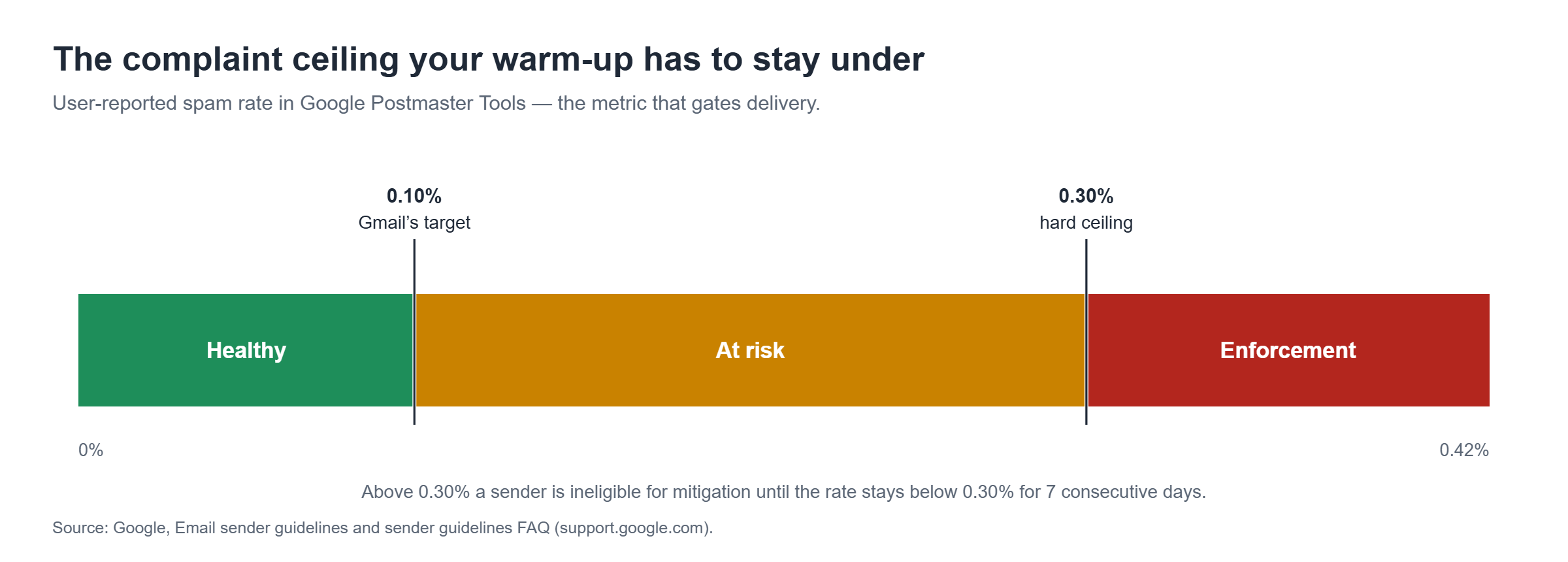
Filtering decisions are made on sender reputation long before anyone reads your subject line. Gmail grades reputation at both the domain and IP level and publishes what each grade means. A High reputation is defined as a “History of very low spam rates, and complies with Gmail’s sender guidelines,” while Low means a “History of sending a significant volume of spam regularly,” according to Google’s Postmaster Tools documentation.
Reputation is earned the only way it can be: consistent volume, passing authentication, and genuine engagement from real recipients, accumulated over time. An email warm up schedule is simply the operating plan for accumulating those signals without tripping a filter along the way.
Run properly, an email warm up schedule establishes four things:
- Identity — the domain, subdomain, and IP pairing you will actually mail from becomes familiar to each provider.
- Predictability — daily volume rises on a curve providers recognize instead of spiking from zero.
- Positive engagement — opens, replies, and inbox-folder placement arrive from recipients who genuinely want the mail.
- Clean complaint history — spam reports stay far below the ceilings that trigger throttling.
Skip the email warm up schedule and you invert all four. A cold domain that sends 50,000 messages on its first day is indistinguishable, from the receiving side, from a domain that was registered to send spam.
The 2026 Rules Your Email Warm Up Schedule Has to Satisfy
An email warm up schedule does not exempt you from sender requirements — it is the period in which you prove you meet them. Three sets of rules apply to almost every commercial sender in the United States.
| Provider | Applies to | Core requirements | Complaint ceiling |
|---|---|---|---|
| Gmail | ~5,000+ messages/day to personal Gmail accounts | SPF and DKIM, DMARC at minimum p=none, From: alignment with SPF or DKIM, one-click unsubscribe, TLS, valid forward and reverse DNS | Below 0.30%; aim below 0.10% |
| Yahoo | Bulk senders to Yahoo and AOL | SPF and DKIM (1024-bit minimum key), valid DMARC policy that passes, functioning list-unsubscribe honored within two days | Below 0.3% |
| Microsoft | 5,000+ messages/day to Outlook.com, Hotmail.com, Live.com (from 5 May 2025) | SPF, DKIM, and DMARC must pass with alignment | Non-compliant mail is rejected with 550 5.7.515 |
Two details are worth calling out. Gmail’s Postmaster Tools spam rate counts only messages recipients manually mark as spam, measured against mail that reached an engaged recipient’s inbox — so heavy filtering can make the number look better than the reality. And “one-click unsubscribe” has a precise technical meaning defined in RFC 8058: a List-Unsubscribe-Post header paired with an HTTPS URI, honored without a confirmation step.
Authentication comes before day one
Nothing in the email warm up schedule below works if authentication is broken. Publish SPF, DKIM, and DMARC, confirm alignment, and verify pass rates in Postmaster Tools before the first send — Google notes that correctly configured senders typically see 95% or higher pass rates for DKIM and DMARC, while SPF runs lower by design because of third-party forwarding. If any of that is unfamiliar, start with our breakdown of what SPF, DKIM, and DMARC each actually do, then handle the records themselves through DNS authentication setup.
The 8-Week Email Warm Up Schedule (Day-by-Day Volume Plan)
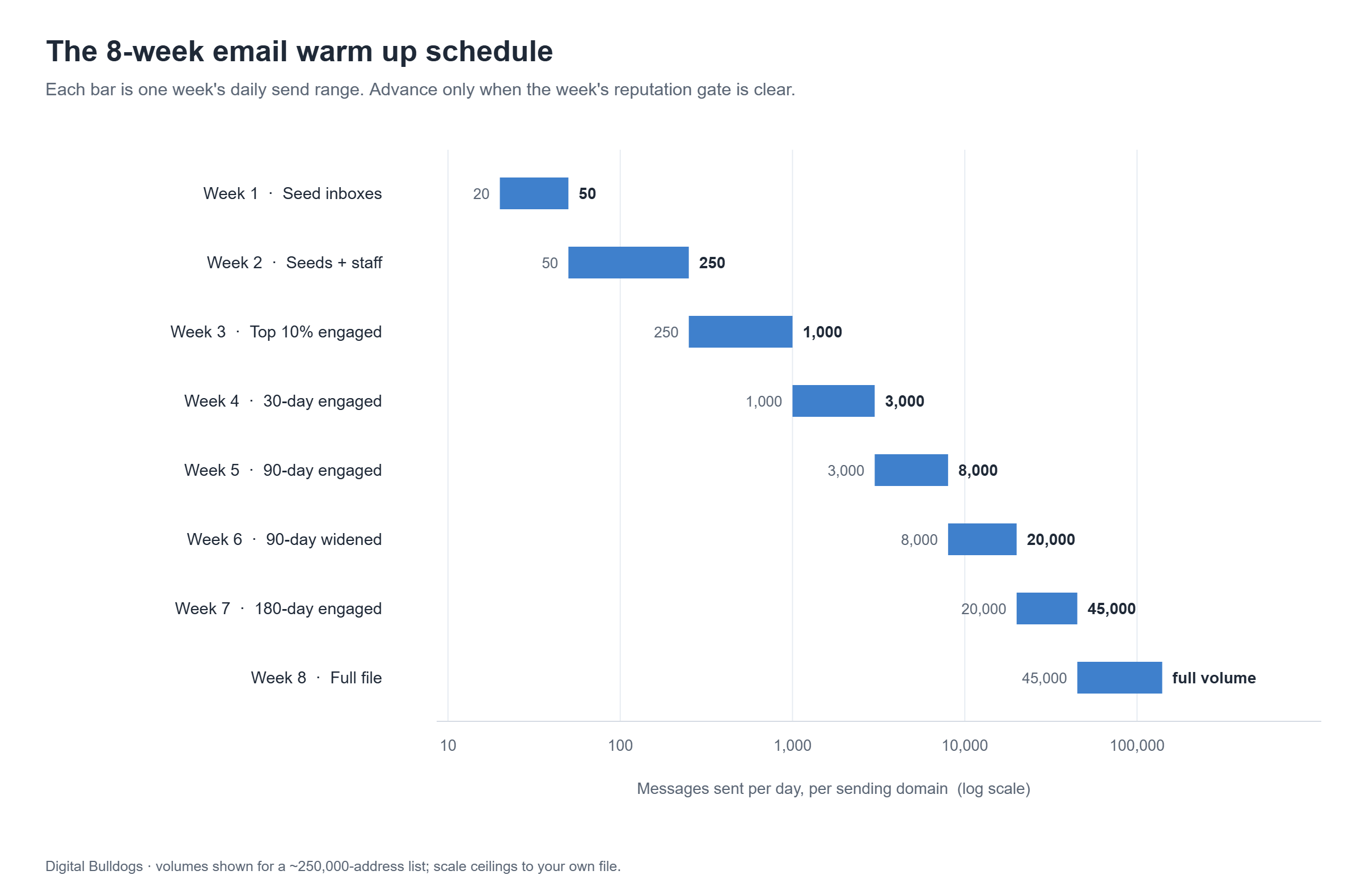
The volumes below are per sending domain, per day, and assume a list of roughly 250,000 addresses. Scale the ceilings to your own list size, but keep the shape of the curve: slow start, compounding growth, and a hard gate at the end of every week.
| Week | Daily volume | Audience | Gate to advance |
|---|---|---|---|
| 1 | 20 → 50 | Seed inboxes only | 100% authentication pass; zero rejections |
| 2 | 50 → 250 | Seeds + staff and partner inboxes | Inbox placement above 90% across Gmail, Yahoo, Outlook |
| 3 | 250 → 1,000 | Top 10% engaged (opened in last 30 days) | Spam rate under 0.10%; bounces under 2% |
| 4 | 1,000 → 3,000 | 30-day engaged | Domain reputation registering in Postmaster Tools |
| 5 | 3,000 → 8,000 | 90-day engaged | Domain reputation Medium or High |
| 6 | 8,000 → 20,000 | 90-day engaged, widened | Spam rate under 0.10% for 7 straight days |
| 7 | 20,000 → 45,000 | 180-day engaged | Reputation holding; no throttling errors |
| 8 | 45,000 → full volume | Full mailable file | Sustained placement at target volume |
Weeks 1–2: seed engagement only
The first fortnight of the email warm up schedule is not a campaign. You are sending small, genuinely useful mail to inboxes that will open it, read it, reply to some of it, and move it out of the promotions tab where relevant. Volume matters far less than the ratio: every message should land, and almost every message should be engaged with.
Send on a weekday cadence — five days a week, at a consistent hour. Providers read consistency as a signal in its own right, and a domain that sends Monday, goes quiet for six days, then sends again reads as erratic. This is also the phase where a real seeding network earns its keep, which is the core of our email warm-up and seeding service.
Weeks 3–4: introduce your most engaged subscribers
Now the email warm up schedule adds real recipients, starting with the people most likely to open: anyone who engaged in the last 30 days. Resist the temptation to sort by recency of signup rather than recency of engagement — a subscriber who joined last week but never opened is a worse warm-up candidate than one who joined in 2023 and opens every send.
Split the daily volume by provider so no single mailbox provider sees a sudden jump. If Gmail is 60% of your file, it should be roughly 60% of each day’s send, not 100% of Tuesday. Watch bounces closely here; if your file has not been validated recently, list hygiene should happen before week three, not after.
Weeks 5–6: scale into the mid-tier
By week five your domain should be visible in Postmaster Tools with enough volume to produce a reputation grade. This is the phase where an email warm up schedule most often goes wrong, because the numbers are large enough to be tempting and the reputation is still thin. Roughly double daily volume every two to three days, never in a single jump, and stop the moment a metric moves the wrong way.
Widen the engagement window from 30 to 90 days here, and keep frequency steady. If open rates sag as the audience widens, that is expected — what matters is that spam complaints do not rise with it. Our guide to why open rates suddenly drop covers how to tell a segment effect from a reputation problem.
Weeks 7–8: full volume and handoff
The last two weeks of the email warm up schedule push to your target daily volume and hold it there long enough to prove the reputation is durable rather than a happy accident. Add your 180-day engaged segment, then the remaining mailable file, and keep a close eye on deferrals — temporary failures are the earliest sign that you are moving faster than a provider is willing to accept.
Most brands we work with reach full sending volume within six to eight weeks. A domain with prior damage takes longer, and that is a domain reputation repair project rather than a warm-up.
How to Adjust the Email Warm Up Schedule for Your List Size
The shape of the email warm up schedule stays the same; the ceilings move. Four common cases:
- Under 25,000 subscribers. Compress to five or six weeks and cap weekly growth at roughly 3×. You will hit full volume before the schedule ends — hold cadence anyway.
- 250,000 to 1 million. Use the table as written, but consider a dedicated subdomain per stream (marketing, transactional, direct response) and warm each one separately.
- Cold outreach and direct response. Slower and smaller. Stay under 50 messages per day per mailbox indefinitely, and expect a ten- to twelve-week ramp, because your complaint risk per thousand is structurally higher.
- Reactivating a dormant domain. Treat it as new. A domain that has not sent in six months has no usable recent history, and any old reputation attached to it is more likely a liability than an asset.
The Reputation Checkpoints That Gate Every Increase
The single most important rule of any email warm up schedule: ramp on metrics, not on the calendar. Week four does not entitle you to week four’s volume. Clear the gate or hold where you are.
- Manual spam-report rate under 0.10% for seven consecutive days
- Domain reputation at Medium or High, and not trending down
- DKIM and DMARC pass rates at 95% or above
- Hard bounces under 2% and falling
- No sustained deferrals or throttling responses from any provider
If a gate fails, hold volume flat for a week — do not reduce to zero, which destroys the consistency you have been building. Google’s own guidance illustrates how unforgiving the ceiling is: senders whose spam rate exceeds 0.30% become ineligible for mitigation until “spam rates remain below 0.3% for 7 consecutive days,” per Gmail’s sender guidelines FAQ. You cannot see any of this without instrumentation, which is what inbox placement monitoring exists to provide.

Why Bot-Based Tools Undermine an Email Warm Up Schedule
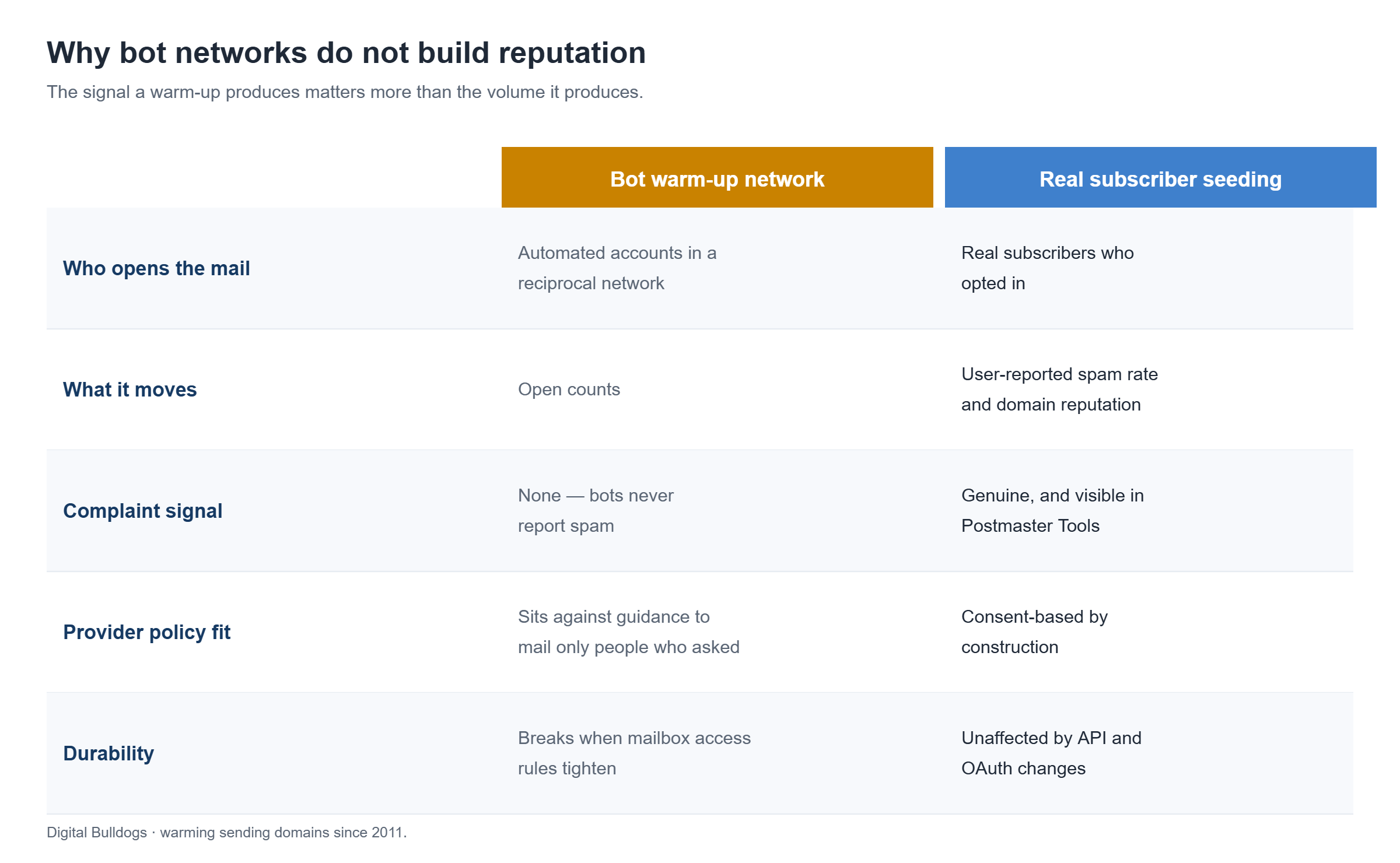
Most warm-up software automates your email warm up schedule by enrolling your mailbox in a reciprocal network: your account automatically sends to and opens mail from thousands of other accounts in the same network. The dashboards look excellent, and that is precisely the problem.
The metric that protects you is Gmail’s user-reported spam rate — messages that real people manually mark as spam. Automated inboxes never file a complaint, so a reciprocal network cannot generate the signal that metric is built from — it can only dilute the number, never validate it. What it manufactures is opens, while the measurement that actually gates your delivery goes untested.
There is a policy dimension too. Google’s sender guidelines are explicit that you should only mail people who asked to hear from you, and Google’s tightening of third-party account access — the retirement of less secure app (basic authentication) sign-in in favour of OAuth, switched off for all Google accounts in March 2025 — has disrupted warm-up tools that connect directly to Gmail mailboxes. Building a reputation strategy on an integration the provider is actively narrowing is a fragile plan.
The alternative is not complicated, just harder to fake: warm into inboxes belonging to real, consenting subscribers who genuinely open and read. Our own engagement network runs on 5,077+ active Gmail subscribers rather than automated accounts, which is why the signals it produces survive contact with a filter.
7 Email Warm Up Schedule Mistakes That Reset Your Progress
- Sending before authentication passes. Every message sent while DMARC fails is a wasted day of the ramp.
- Ramping on the calendar. The dates are a plan, not a permission slip. Metrics decide.
- Mailing the full file in week three. The most common way an email warm up schedule dies, usually justified by a launch date.
- Inconsistent sending. Gaps of several days undo the predictability you are trying to establish.
- Warming the wrong identity. If you will mail from
mail.example.comon a dedicated IP, warm that exact pairing — not the root domain on shared infrastructure. - Ignoring Yahoo and Microsoft. Gmail gets the attention; Microsoft now rejects unauthenticated bulk mail outright.
- Treating warm-up as one-time. Reputation decays. A domain that goes quiet for a quarter needs a fresh ramp.
If you are already seeing damage rather than planning a launch — blocklist entries, sudden throttling, mail vanishing into spam — the fix sequence is different. Start with what to do after a blacklist hit and our broader email deliverability guide before restarting any ramp.
How Digital Bulldogs Runs an Email Warm Up Schedule
We have been warming domains since 2011, across affiliate, direct-response, agency, and in-house senders. Our email warm up schedule runs in four stages: deploy a seed network of real monitored inboxes across Gmail, Outlook, and Yahoo; ramp daily volume on a fixed schedule calibrated to domain age and list size; prioritise the most engaged subscribers first so signals stay strong as volume grows; and hold a reputation checkpoint before each increase.
Most brands reach full sending volume within six to eight weeks. Month to month, no long-term contract. Full detail lives on the email warm-up and seeding page, and the wider email delivery service covers the diagnostics that surround it.
Email Warm Up Schedule FAQ
How long does an email warm up schedule take?
Six to eight weeks for most senders on a healthy list. Smaller lists can compress to five or six; cold outreach and previously damaged domains routinely take ten to twelve.
How many emails should I send on day one?
Twenty to fifty, to seed inboxes only. Day one is about proving authentication and acceptance, not about reach.
Can I warm a domain and a dedicated IP at the same time?
Yes, and you generally should, because providers evaluate the pairing. Expect it to take slightly longer than warming a domain on established shared infrastructure.
Does an email warm up schedule work for cold outreach?
The mechanics work, but the ceilings are much lower and the complaint risk is much higher. Keep per-mailbox volume low, use several mailboxes rather than one large sender, and accept a longer ramp.
What happens if I miss a few days mid-ramp?
Resume at roughly half the volume you stopped at and rebuild from there. Do not pick up where you left off — the gap itself is a signal, and jumping straight back to peak volume reads as a spike.
Do subdomains need their own warm up schedule?
Yes. Reputation attaches to the sending subdomain, so a new news.example.com starts cold even when the root domain is well established.
Start Your Email Warm Up Schedule With a Delivery Audit
An email warm up schedule built on broken authentication or an unvalidated list will fail no matter how patient the curve is. Before week one, get the domain, DNS, sender reputation, and complaint signals checked properly — that audit is free, and it is the difference between an eight-week ramp and an eight-week detour.
Book a free delivery audit and pick the Email Delivery track. We will tell you whether your domain is ready to start warming, and what the realistic timeline looks like for your list.
