
Email Deliverability Guide: How to Reach the Inbox Every Time (2026)
Roughly one in five commercial emails never reaches an inbox at all, and that number climbs significantly higher for senders who have never diagnosed a real deliverability problem. Most teams find out the hard way: a campaign that used to generate steady replies suddenly goes quiet, open rates fall off a cliff, and nobody can say exactly why. Email deliverability is the discipline of understanding why that happens and building the technical and behavioral foundation that keeps it from happening again.
This guide breaks down how mailbox providers actually decide where your mail lands, what breaks deliverability in practice, what it costs a business when nobody catches the problem early, and the step-by-step framework we use with clients to fix and protect it long term. If you manage sending for an agency, an affiliate program, or an in-house marketing team, this is the reference we wish someone had handed us when we started working on domain reputation repair back in 2011.
What Email Deliverability Actually Means
“Delivery” and “deliverability” get used interchangeably, but they measure two different things. Delivery simply means a receiving mail server accepted your message instead of rejecting or bouncing it. Deliverability measures where that accepted message actually ends up: the primary inbox, a secondary tab like Promotions, or the spam folder. A campaign can post a 99% delivery rate and still fail commercially because three-quarters of it landed in spam, never seen by a real person. When we talk about improving email deliverability, we mean improving inbox placement, not just avoiding hard bounces.
Mailbox providers like Gmail, Outlook, and Yahoo built their filtering systems around one goal: protect their users from unwanted mail without blocking messages people actually want to receive. To do that, they evaluate the sender’s behavior over time, not just the content of a single message. That distinction, sender-level trust versus message-level content, is the single most important idea in this entire field, and it is the one most marketing teams misunderstand first.
The Trust Signals That Decide Where Your Email Lands
Every major mailbox provider evaluates a combination of technical and behavioral signals before deciding whether your next message deserves a spot in the inbox. None of these signals work in isolation, and a weakness in one area can drag down an otherwise healthy sending domain over a matter of weeks.
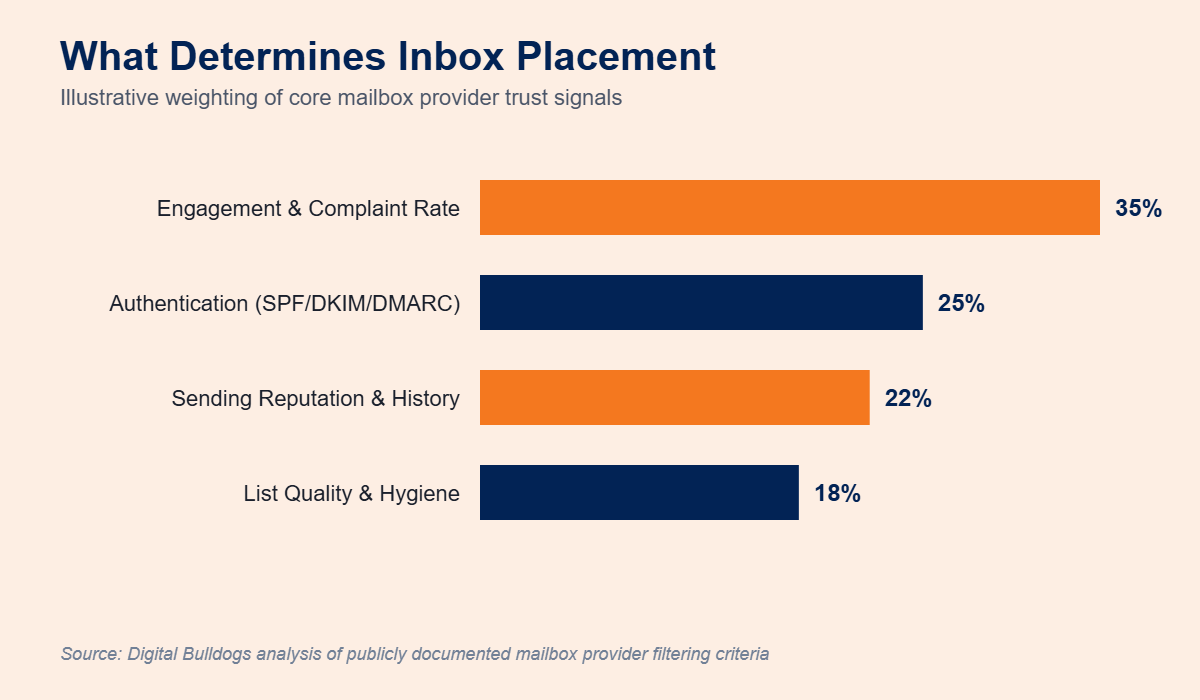
- Engagement and complaint rate: Opens, clicks, replies, deletions-without-reading, and spam complaints tell a mailbox provider whether real humans actually want your mail. Low engagement, even without complaints, quietly signals that a domain is not worth prioritizing.
- Authentication: SPF, DKIM, and DMARC prove that a message claiming to come from your domain actually originated from a server you authorized to send it, closing off a common spoofing and phishing vector.
- Sending reputation and history: IP and domain reputation accumulate over time and are damaged by sudden volume spikes, spam-trap hits, and blacklist listings, then take real time to rebuild.
- List quality and hygiene: Stale, purchased, or unverified lists generate the bounces and complaints that erode every other signal on this list, often before a marketing team even notices.
For background on how mailbox providers describe their own filtering criteria, Google publishes ongoing sender expectations through its Gmail bulk sender guidelines, and the Messaging, Malware and Mobile Anti-Abuse Working Group publishes deliverability and sender best-practice research that much of the industry references when setting internal standards.
The Real Cost of Poor Deliverability
Deliverability problems rarely show up as a single visible failure. Instead they show up as a slow, compounding tax on every campaign a business sends. A list that should be generating consistent replies instead produces silence, and because nothing technically “broke,” the team often blames creative, offer, or timing instead of the actual cause. That misdiagnosis is expensive in three specific ways.
- Wasted spend. Paid traffic, list acquisition, and creative production all lose value when the resulting emails never reach an inbox.
- Compounding reputation damage. Continuing to send at normal volume into a damaged domain reinforces the very signals causing the problem, making the eventual repair take longer.
- Lost revenue windows. Time-sensitive offers and affiliate promotions have a short shelf life. A domain suppressed for even a week can miss an entire revenue cycle that never comes back.
This is why we encourage clients to treat deliverability as ongoing infrastructure, similar to site uptime, rather than something to investigate only after a launch has already underperformed.
Why Deliverability Suddenly Breaks
Deliverability rarely fails because of one dramatic mistake. It usually erodes gradually until a threshold gets crossed and a mailbox provider throttles or filters a domain all at once. In our experience repairing sender reputations, the same handful of root causes show up again and again:
- Sending to a purchased, scraped, or long-unengaged list that trips spam traps
- Skipping a proper warm-up sequence after switching ESPs, IPs, or domains
- Ignoring rising complaint rates until a mailbox provider takes automatic action
- Incomplete or misconfigured SPF, DKIM, or DMARC records
- Sudden, unexplained volume spikes that resemble compromised-account behavior
- Neglected list management, letting bounces and inactive subscribers accumulate unchecked
Any one of these can quietly suppress inbox placement for weeks before a team notices the drop in replies or conversions. That is exactly why ongoing inbox placement monitoring matters as much as fixing the original problem, since it shortens the gap between a signal degrading and someone actually noticing.
How Authentication Impacts Inbox Placement
Authentication is the fastest, most measurable lever most senders can pull. Domains sending without complete SPF, DKIM, and DMARC coverage are far more likely to be treated as unverified, which pushes borderline messages toward spam by default regardless of how strong the engagement otherwise looks. The chart below illustrates the kind of placement gap we typically see between fully authenticated senders and senders missing one or more authentication layers.
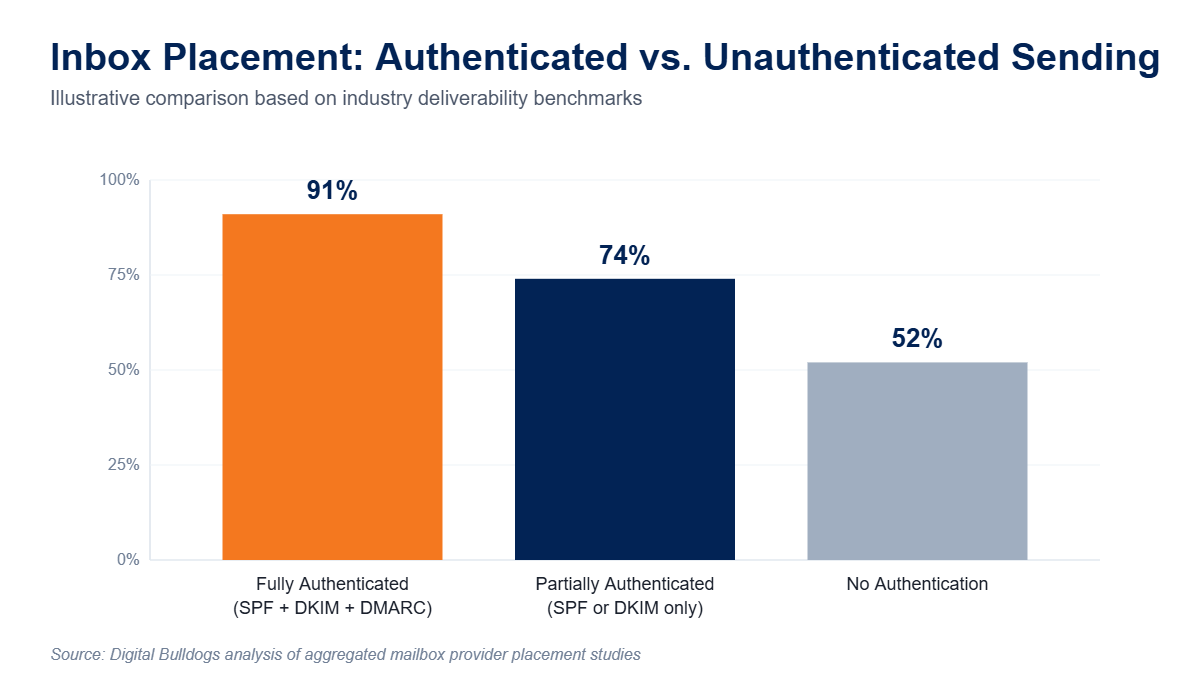
A proper DNS authentication setup is table stakes, not an advanced tactic. If you have never confirmed your SPF, DKIM, and DMARC records line up correctly across every sending source, including third-party platforms and subdomains, that is the first place to look before touching subject lines, content, or send times.
Common Deliverability Myths
A few persistent myths keep marketing teams chasing the wrong fix. Clearing these up usually saves more time than any single technical change.
- “Certain words trigger spam filters.” Modern filters rely far more on sender trust and engagement history than on specific vocabulary in the subject or body.
- “A higher send volume always helps visibility.” Volume without engagement accelerates reputation damage rather than reach.
- “Deliverability is an ESP problem, not ours.” Your email service provider handles infrastructure, but authentication, list hygiene, and sending behavior are the sender’s responsibility.
- “Once it’s fixed, it stays fixed.” Reputation is a moving target that needs continuous monitoring, not a one-time repair.
A Step-by-Step Framework for Fixing and Protecting Deliverability
When a client comes to us with a sudden drop in inbox placement, we work through the same sequence every time, because guessing which factor caused the problem wastes time a live campaign does not have.
- Audit authentication first. Confirm SPF, DKIM, and DMARC are correctly published and aligned for every sending source, including third-party platforms, before assuming the problem is behavioral.
- Check reputation and blacklist status. Domain and IP reputation, plus any active blacklist listings, need to be identified before anything else is changed, since fixing content while a blacklist listing is active wastes the effort.
- Review list hygiene. Remove stale, unengaged, and unverifiable addresses that generate complaints or hit spam traps, and segment remaining contacts by engagement level.
- Rebuild trust with a structured warm-up. Gradually ramp volume on a repaired domain or new IP so mailbox providers can relearn that the sender is legitimate, rather than reintroducing full volume immediately.
- Monitor continuously. Ongoing inbox placement monitoring catches the next problem while it is still small enough to fix in days, not weeks.
Each of these steps supports the others, and skipping one tends to undermine the rest. Domain reputation repair without list hygiene tends to relapse quickly. Warm-up without correct authentication rarely holds past the first few sends. The framework only works end to end, which is why we built our service model around all five stages rather than selling them piecemeal.
What Fixing Deliverability Looks Like in Practice
Digital Bulldogs has focused exclusively on email deliverability and sender reputation since 2011, working with agencies, affiliates, and direct-response senders who depend on the inbox to run their business. You can see the outcomes of that work, including before-and-after inbox placement data, on our case studies page. If your situation involves a mix of deliverability and data challenges, our identity resolution and audience data services are often part of the same conversation, since a clean, well-matched list directly supports every trust signal covered above.
Frequently Asked Questions
How long does it take to fix email deliverability?
Authentication issues can often be corrected within days once DNS changes propagate. Reputation repair and warm-up typically take two to six weeks depending on how much damage occurred and how much volume needs to be rebuilt.
Can one blacklist listing really affect my whole domain?
Yes. A single active listing can suppress inbox placement across multiple mailbox providers, even ones that do not use that blacklist directly, because reputation signals are often shared or correlated across systems.
Do I need all three of SPF, DKIM, and DMARC?
Yes. Each one verifies a different part of the sending chain, and mailbox providers increasingly expect all three to be present and aligned before treating a domain as fully trustworthy. See our deliverability FAQ for more detail on individual record requirements.
Will switching email service providers fix a reputation problem?
No, and it often makes things worse. Reputation is tied to your sending domain and IP history, not just the platform you use, so moving providers without repairing the underlying signals usually carries the same problems to the new platform.
Get a Straight Answer About Your Deliverability
If open rates dropped, replies stopped, or you have never actually confirmed your authentication and reputation are healthy, guessing is the most expensive option on the table. Book a free deliverability audit and we will walk through your domain’s authentication, reputation, and list health with you directly. Prefer to describe your situation first? Fill out our contact form and a deliverability specialist will follow up to schedule time to talk it through.

One Comment