
CAN-SPAM Requirements Checklist for Email Marketers
Before sending a marketing email in the United States, use this can-spam requirements checklist: confirm whether the message is commercial, check that sender details and the subject line are accurate, identify it as an ad where required, and include a valid postal address and a clear way to unsubscribe. Make sure your opt-out process works, requests are honored on time, and any agency sending on your behalf follows the same rules—the FTC’s compliance guide explains these duties and why outsourcing does not remove your responsibility.
This article walks through commercial versus transactional messages, sender details and footer checks, unsubscribe handling, coordination with agencies and affiliates, and a final pre-send review. It also explains why legal compliance alone does not guarantee inbox placement: Gmail’s sender guidelines set separate authentication and subscription requirements that affect delivery.
The CAN-SPAM requirements checklist: start here
Before sending commercial email, check your sender details, subject line, ad identification, postal address and unsubscribe process. The FTC’s commercial email compliance guide also makes clear that you must honor opt-outs and monitor anyone sending on your behalf. Use these items as a practical pre-send review:
- Use accurate sender information. Make sure your From, To, Reply-To and routing information are accurate and identify the person or business sending the message.
- Keep the subject line truthful. It should accurately reflect what the email contains—not mislead someone into opening it.
- Include required ad identification. Clearly identify the message as an advertisement where required; do not assume every email qualifies for an exception.
- Add a valid physical postal address. Include a qualifying street address, registered post office box or registered private mailbox.
- Provide a clear opt-out. Make it easy for recipients to understand how to stop future marketing emails, including the option to stop all marketing messages from you.
- Honor unsubscribe requests. Confirm that requests reach the people and systems responsible for stopping future sends.
- Oversee outside senders. If an agency, affiliate or other provider sends on your behalf, review its practices. Outsourcing the work does not remove your responsibility.
Scope: This article provides general information about US federal CAN-SPAM requirements, not individualized legal advice. Treat the checklist as a review tool—not a certification of compliance. The sections below explain how to assess commercial content, handle exceptions and put these checks into practice.
Does your email count as commercial?
If your email’s primary purpose is to advertise or promote a commercial product or service, treat it as commercial. CAN-SPAM applies to business-to-business messages and individual commercial emails—not just bulk campaigns. An existing customer relationship does not turn a product promotion into a transactional message.
Transactional or relationship messages serve specific purposes, such as confirming an agreed purchase, providing warranty information or updating a customer about an account. Under the CAN-SPAM Rule’s primary-purpose criteria, a message mixing transactional and promotional content is commercial if a reasonable recipient would interpret its subject line as advertising, or if the transactional content does not appear, in whole or substantial part, at the beginning.
Hypothetical examples
- Order confirmation: An email with the subject “Your order confirmation” that begins with purchase details and delivery information is consistent with a transactional purpose.
- Product promotion: An email encouraging a past customer to shop a new collection is commercial. The earlier purchase does not change the new message’s promotional purpose.
- Receipt with an offer: A receipt that starts with substantial transaction details and includes an offer below is not automatically commercial. Review the subject line and content placement rather than assuming any promotion changes the classification.
Transactional status is not permission to disguise the sender: these messages still must not contain materially false or misleading header information. Before choosing a template, identify what the message actually does—not simply which customer segment receives it.
Check sender details, subject lines and the footer
Check that the message accurately identifies the sender, describes its content honestly, and includes the required disclosures. Use these checks before approving a send:
- Review From and Reply-To details. Under the statute’s sender-information and disclosure requirements, header information must not be materially false or misleading. Check the sender name, email address and reply address together: they should not disguise who initiated the message.
- Read the subject line against the email itself. It must not mislead recipients about the message’s content. Check that the offer or topic promised in the subject is actually what the email delivers.
- Make the advertising nature clear. Commercial messages must clearly and conspicuously identify themselves as advertisements or solicitations unless the recipient gave prior affirmative consent. That exception concerns ad identification only; it does not remove the postal-address or unsubscribe requirements.
- Check the postal address and opt-out notice. Include a valid physical postal address and a clear, conspicuous explanation of how recipients can stop future commercial email. Under the CAN-SPAM Rule’s postal-address definition, the address may be a current street address, an accurately registered USPS post office box, or a private mailbox accurately registered with a commercial mail receiving agency established under USPS regulations.
Implementation recommendation: Inspect the actual delivered test message, not just the editor preview. Confirm that the postal address is visible and the opt-out notice is easy to understand. Check the displayed sender details and subject line in the inbox, too.

Make unsubscribe work—and honor the request
Give recipients a clear, working way to stop your marketing emails—and make sure their choice reaches your sending system. Keep the opt-out mechanism capable of receiving requests for at least 30 days after sending, and honor requests within 10 business days. Treat that deadline as an outside limit, not a reason to delay processing.
A preference menu can let people choose fewer messages or specific topics, but it must also offer a way to stop all marketing email from the sender. Someone who wants to leave entirely should not have to unsubscribe from each category separately.
The CAN-SPAM Rule sets clear restrictions on unsubscribe friction. You cannot:
- Charge a fee to unsubscribe.
- Require information beyond the recipient’s email address and opt-out preferences.
- Require steps beyond sending a reply email or visiting a single web page.
Keep those legal requirements separate from mailbox providers’ one-click unsubscribe rules. They are distinct requirements; satisfying one does not establish compliance with the other.
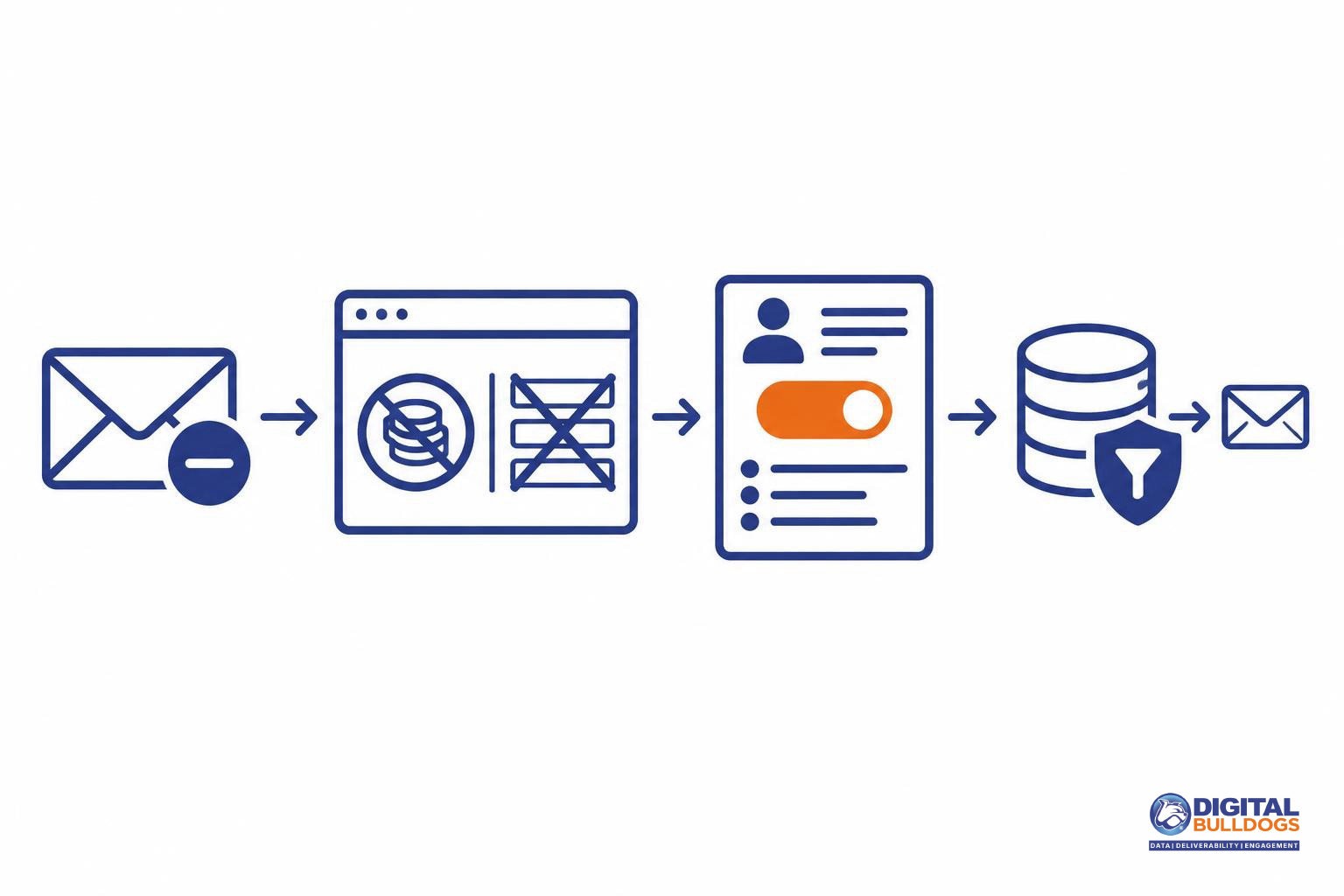
Before sending, test the complete opt-out path. Use a test recipient to open the email, submit an unsubscribe request, and confirm that the sending system suppresses that address from future marketing sends. Check the all-marketing option as well as any narrower preferences. This is an operational safeguard—not a CAN-SPAM recordkeeping requirement—and helps catch a working unsubscribe page that is not actually updating your sending list.
Keep agencies, affiliates and suppression lists aligned
Keep ownership of opt-outs clear, even when someone else runs your campaigns. Outsourcing does not remove your responsibility: both the business being promoted and the company sending the email may be legally responsible for CAN-SPAM violations.
Opted-out addresses are not inventory to pass to another marketer. CAN-SPAM prohibits selling, leasing, exchanging or otherwise transferring or releasing those addresses, except for compliance with the law or another provision of law. The statute separately addresses renewed sending after a recipient gives subsequent affirmative consent. These provisions do not create a general workaround for marketing to, or trading, suppressed addresses.
Build that responsibility into your day-to-day workflows:
- Assign an opt-out owner. Name the person responsible for receiving requests, updating suppression records and confirming that agencies and platforms apply them.
- Check partner workflows. Ask agencies and affiliates how they capture unsubscribe requests, share suppression updates and prevent excluded contacts from returning to campaigns.
- Check suppressions before audience changes. Screen imports, enrichment outputs and reactivation audiences against current suppression records. During platform migrations, carry suppression status forward rather than moving only active contacts.
- Keep an audit trail. Record suppression updates and any subsequent affirmative consent so your team can understand why an address is excluded or eligible for renewed sending.
Digital Bulldogs’ list management and hygiene services can help with the operational work of maintaining audience records—not provide legal approval of a list or campaign.
Legal compliance is not an inbox-placement guarantee
Meeting CAN-SPAM requirements does not guarantee inbox placement or establish that you meet a mailbox provider’s rules. Gmail’s sender guidelines separately address authentication, unwanted mail and unsubscribe implementation. Gmail also advises sending subscription messages only to people who want them. Do not treat the federal checklist as permission to use purchased or scraped lists.
The unsubscribe requirements also differ. CAN-SPAM requires a functioning return email address or another Internet-based way to request an opt-out. Gmail’s rules require one-click unsubscribe for applicable bulk marketing and subscribed messages, alongside a clearly visible unsubscribe link in the message body. A footer link alone does not establish that Gmail’s one-click requirement is met.
Keep these checks separate in your sending process:
- Provider requirements: Use the Gmail and Yahoo bulk sender requirements checklist to review provider-specific obligations without confusing them with federal law.
- Authentication: Follow the SPF, DKIM and DMARC setup guide to review your technical setup; a compliant footer does not authenticate your mail.
- Delivery troubleshooting: If messages are landing in junk, review why emails go to spam and how to investigate rather than assuming legal compliance rules out a delivery problem.
Use the federal checklist to review legal obligations, then assess authentication, recipient expectations and provider policies as separate pre-send checks.
Run a final pre-send review
Before sending, review a delivered test message—not just the version in your email editor—and resolve any open issues with a named owner.
- Inspect the message as a recipient. Check the sender details, subject line, ad identification where required, postal address and visible unsubscribe link against the FTC’s commercial email checklist.
- Walk through the unsubscribe path. Submit a test request and confirm that it reaches the right system. The process must not require a fee, information beyond the recipient’s email address and opt-out preferences, or steps beyond replying or visiting a single web page, under the CAN-SPAM Rule’s opt-out restrictions.
- Check suppression end to end. Verify that the request blocks future commercial sends across your platform, agencies and relevant workflows. Assign someone to confirm that requests are honored within the 10-business-day deadline.
- Name an owner for unresolved issues. Record the problem, who will fix it and who will verify the fix before launch.
Keep the reviewed message and test notes for internal accountability. This is a recommended operating practice, not a CAN-SPAM retention mandate. Send questions about legal classification, consent exceptions or other applicable laws to qualified counsel.
For the technical side, Gmail’s sender guidelines set separate authentication and subscription requirements. Digital Bulldogs’ email deliverability audit can help you assess authentication, list hygiene and inbox placement—not provide legal advice or guarantee delivery. Book a free consult
Keep researching on Digital Bulldogs
Frequently asked questions
Does CAN-SPAM apply to business-to-business email?
Yes. CAN-SPAM covers commercial email sent to businesses, not just consumers. It also applies beyond bulk campaigns, so a promotional message does not fall outside the law simply because you send it individually. The FTC’s compliance guide explicitly confirms that business-to-business email is covered.
Does every marketing email need to say it is an advertisement?
Generally, commercial email must clearly and conspicuously identify itself as an advertisement or solicitation. That requirement does not apply when the recipient has given prior affirmative consent to receive the message. The exception concerns advertising identification only; it does not remove the other applicable duties, such as providing an unsubscribe option.
Can I use a post office box instead of my street address?
Yes. You can use a post office box that you have accurately registered with the United States Postal Service. A properly registered private mailbox with a qualifying commercial mail receiving agency is another option. The CAN-SPAM Rule’s postal-address definition allows these alternatives to a current street address.
What are the CAN-SPAM deadlines for processing unsubscribe requests?
You must honor an unsubscribe request within 10 business days and keep the opt-out mechanism working for at least 30 days after sending the message. Treat these as separate checks: remove the recipient from covered future marketing sends, and make sure the unsubscribe route in the original email remains usable.
Am I still responsible if an agency sends my marketing email?
Yes. Hiring an agency does not let you contract away your legal responsibility. Both the business promoted in the message and the company that sends it may be held responsible. Before sending, agree on who checks message content, maintains suppression lists and handles unsubscribe requests—and verify that those tasks are actually completed.
Is CAN-SPAM compliance enough to meet Gmail’s sender requirements?
No. CAN-SPAM compliance does not replace Gmail’s separate sender requirements or guarantee inbox placement. Google’s sender guidelines cover authentication, unwanted-mail controls and unsubscribe requirements, including one-click unsubscribe for applicable bulk marketing and subscription messages. Review those requirements alongside your legal checklist rather than treating a compliant footer as a complete delivery strategy.
Sources
- CAN-SPAM Act: A Compliance Guide for Business · Federal Trade Commission
- 15 U.S.C. § 7704 — Other protections for users of commercial electronic mail · U.S. Government Publishing Office
- 16 CFR Part 316 — CAN-SPAM Rule · Office of the Federal Register and U.S. Government Publishing Office
- Email sender guidelines · Google