
Holiday Email Deliverability: Plan for Peak Volume
To protect holiday email deliverability, increase Black Friday and holiday sending gradually from your usual volume, keep pacing consistent, and focus on people who expect your emails. Keep unsubscribed and suppressed contacts out of every campaign, following Spamhaus guidance on permission, warm-up, and suppression, rather than reviving old lists to reach more people.
Before launch, check authentication and unsubscribe handling. During campaigns, watch delivery errors, deferrals, and reputation signals—not just opens—and reduce volume if delivery problems appear, as Google’s guidance for sending to personal Gmail accounts recommends.
This guide covers those preflight checks, building a holiday audience, pacing increases around your sending history, and monitoring campaigns as they run. It also explains when to hold, reduce, or investigate sending—and how to carry suppression and monitoring forward after the holidays.
Protect reputation before increasing holiday volume
To protect email deliverability during the holidays, increase sending volume gradually, prioritize subscribers who want your mail, verify authentication and unsubscribe handling, and reduce sending when delivery problems appear. For mail sent to personal Gmail accounts, Google recommends gradual volume increases and consistent pacing, with volume reductions when bounces or deferrals rise.
Treat peak-season sending as an operating plan, not just a campaign calendar:
- Check readiness: Confirm that authentication is working and recipients can unsubscribe easily before campaigns launch.
- Choose eligible audiences: Start with subscribers who have given permission and shown interest. Keep unsubscribed and otherwise suppressed contacts out.
- Pace campaigns: Build from your established sending history rather than jumping straight to your largest holiday audience.
- Monitor responses: Watch delivery errors, deferrals, complaints, and reputation signals while campaigns run.
- Adjust: Hold or reduce sending when problems emerge, and investigate before expanding again.
Audience selection matters as much as technical setup. Yahoo’s sender best practices emphasize sending to engaged recipients, authentication, and easy unsubscribe handling. A larger list is not a reason to include people who no longer want your messages.
This plan is for permission-based holiday marketing—not cold outreach or attempts to bypass filtering. Spamhaus’s sender guidelines reinforce permission-based sending, gradual warm-up, and preserving suppression records, while warning against artificial engagement services.
If you need the fundamentals first, use our complete email deliverability guide. Here, the focus is the practical sequence for preparing, pacing, monitoring, and adjusting holiday campaigns.
Check authentication and unsubscribe handling before launch
Before holiday campaigns launch, send test messages from every active marketing platform and check what recipients actually receive. Review authentication results in the message headers, then test the unsubscribe process from request through suppression. A correct-looking DNS record is not enough to confirm that each platform is sending as intended.
- Check authentication and alignment. Confirm SPF and DKIM pass, DMARC is published, and the visible From domain aligns with the authenticated SPF or DKIM domain. For implementation steps, use our guide to SPF, DKIM and DMARC setup for high-volume senders.
- Test promotional unsubscribe handling. Yahoo’s sender requirements call for bulk senders to use SPF, DKIM and DMARC with alignment, provide easy unsubscribe handling, and include a clearly visible unsubscribe link. For promotional messages, verify that the required one-click unsubscribe mechanism works—not just the link in the footer. Keep marketing traffic separate from transactional messages such as order confirmations, rather than treating both streams identically.
- Check each provider’s scope. Cross-check messages sent to Outlook consumer accounts against Microsoft’s high-volume sender announcement, which requires SPF, DKIM and DMARC for covered senders. Do not treat these consumer Outlook requirements as rules for every Microsoft-hosted business mailbox.
For personal Gmail recipients, Google’s sender guidelines also require covered bulk marketing and subscription messages to support one-click unsubscribe and include a visible unsubscribe link. Authentication is a prerequisite, not an inbox-placement guarantee: recipient complaints and sending practices still matter.
Build the holiday audience without reviving suppressed contacts
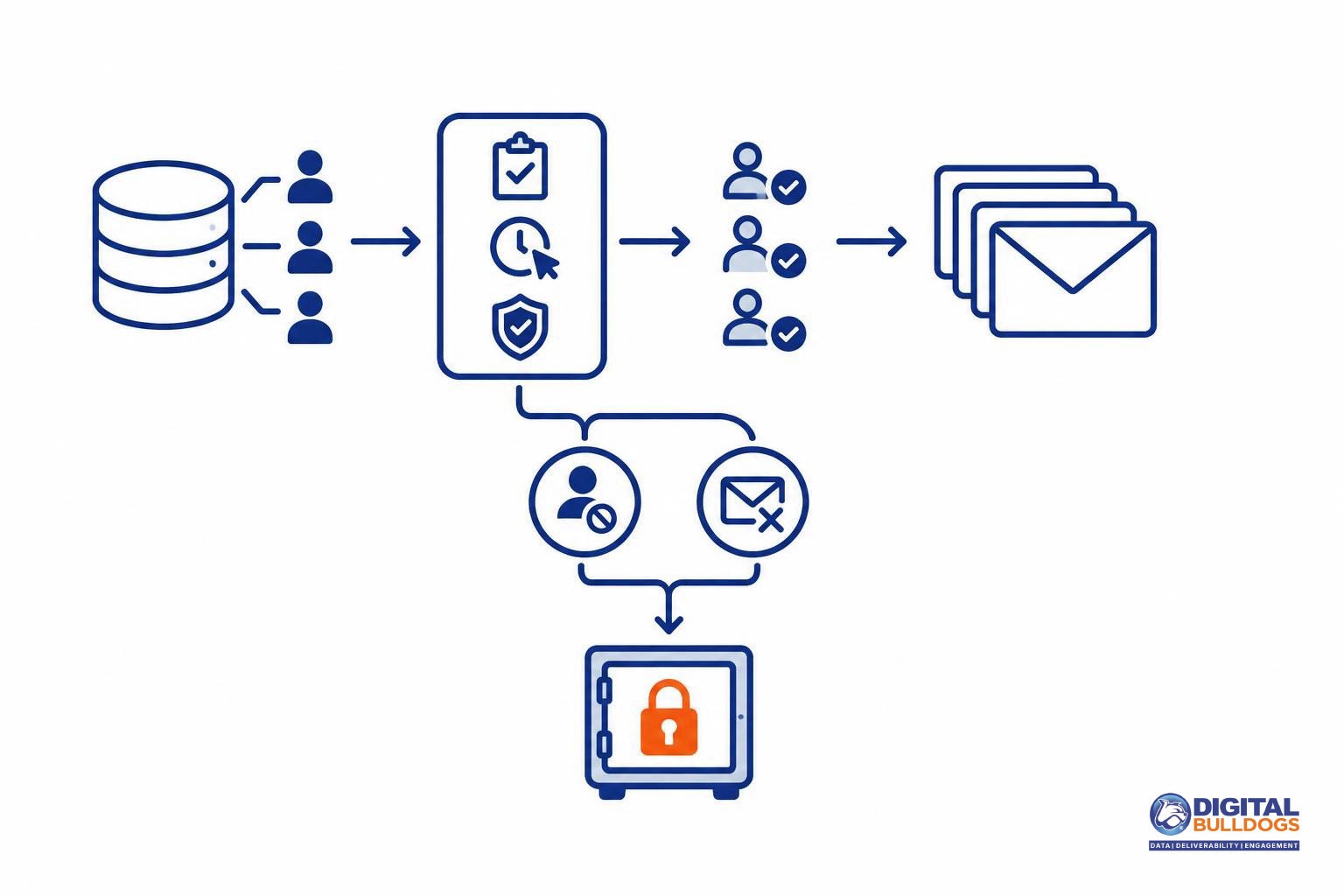
Choose who should receive your holiday campaigns before deciding how much email to send. Start with engaged subscribers who gave permission, not every address available in your database. Spamhaus’s sender guidance supports permission-based sending, prioritizing engaged recipients, preserving suppressions across systems, and removing hard-bouncing addresses.
- Check eligibility: Review consent records, recent clicks, replies, and other available subscriber activity. Define eligibility around your sending history and subscriber relationship rather than an arbitrary engagement window.
- Carry exclusions into every import: Apply unsubscribe and hard-bounce suppressions before uploading holiday audiences to a new platform or campaign. A system migration should not make an excluded address eligible again.
- Review last season’s audience: Do not assume an inactive contact is eligible simply because they received last year’s holiday offers. Check their permission, suppression status, and subsequent activity before including them.
Address validation can help identify some address problems, but it does not prove permission or guarantee that a list contains no spam traps. Treat validation as a hygiene check—not authorization to contact someone or a reason to override suppression records.
Check US commercial-email compliance, too. The FTC’s CAN-SPAM business guide calls for accurate header information, nondeceptive subject lines, identification of advertising where required, a valid physical postal address, and a working opt-out mechanism. Honor opt-out requests and keep those exclusions in place. These federal legal requirements are distinct from mailbox-provider expectations: legal compliance alone does not establish permission or ensure inbox placement.
Ramp peak season sending volume around your own history
Prepare for Black Friday by building from your established sending patterns, not by applying a universal growth formula. Google’s guidance on increasing sending volume recommends starting with engaged recipients, increasing gradually, avoiding sudden bursts, and watching server responses as you go. That guidance applies to personal Gmail accounts.
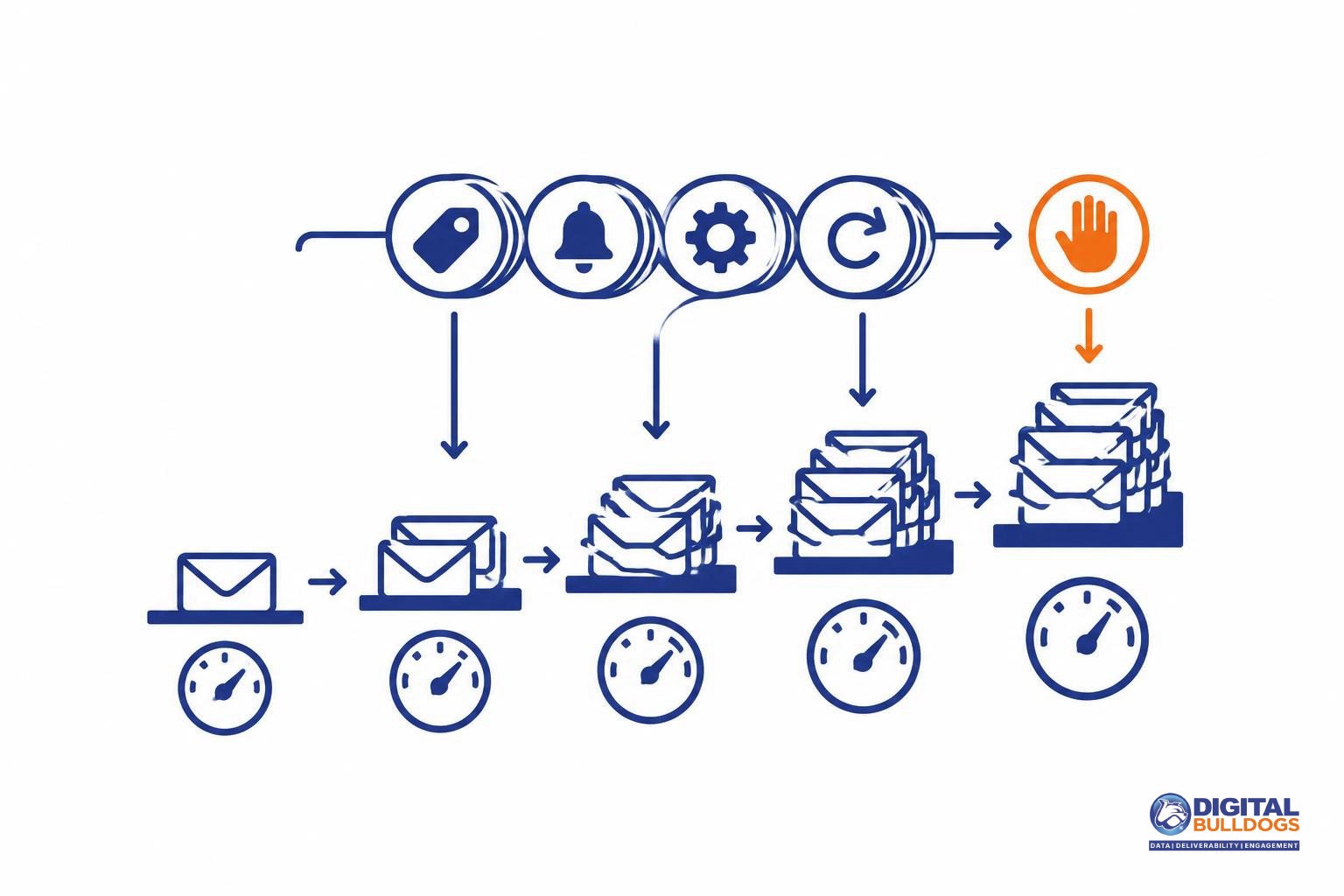
Before launch, create a campaign inventory that makes overlapping sends visible. Include:
- Promotions: scheduled sale announcements and offers.
- Reminders: follow-ups that may reach the same subscribers.
- Automations: welcome, abandoned-cart, and other triggered messages that continue during the sale.
- Resends: additional attempts that add to the original campaign’s volume.
Use that inventory alongside your sending history to propose a ramp. Compare planned traffic with the volume and cadence you normally send, then adjust based on observed responses from each mailbox provider. A schedule on a calendar is not evidence that the next increase is safe; deferrals, bounces, or other delivery problems are reasons to reassess before adding volume.
If preparation time is short, narrow the holiday audience to engaged subscribers rather than expanding to the full list at the last minute. Keep overlapping campaigns in view so a smaller promotion does not become a burst when reminders and automations fire together.
Gradual sending is not simulated engagement. It means sending wanted messages to real subscribers at a measured pace. Spamhaus’s sender guidelines warn against services that manufacture opens, clicks, and replies to make traffic appear legitimate. For background on that distinction, read what email warm-up tools can and cannot do; a tool should not replace permission, consistent sending, or attention to delivery feedback.
Monitor delivery signals while campaigns are running
Review each mailbox provider separately while holiday campaigns are running. A receiving server accepting a message does not establish that it reached the inbox, so keep delivery acceptance and inbox placement separate in your reporting.
Build a repeatable review around these signals:
- SMTP responses: Check acceptance, temporary deferrals, and permanent failures by provider. Look for changes in response codes and rejection messages, not just an overall delivery percentage.
- Authentication and reputation: Review available authentication results and provider diagnostics. Google’s guidelines for sending to personal Gmail accounts recommend monitoring server responses and reputation, and reducing sending volume when bounces or deferrals appear.
- Complaint feedback: Review available complaints alongside campaign and audience details. Yahoo’s sender best practices recommend using its Complaint Feedback Loop to identify dissatisfied recipients and remove them from mailing lists.
Compare each campaign with your own recent, comparable sends at that provider. Look for unusual shifts in deferrals, failures, complaints, or reputation rather than treating a universal bounce-rate cutoff as permission to keep sending.
Keep opens in a supporting role. Google cautions that third-party open rates are not necessarily an accurate indicator of deliverability or spam classification. An open-rate change can prompt investigation, but it should not independently justify scaling volume, declaring success, or diagnosing a reputation problem. For that investigation, review what to check when open rates suddenly drop.
Assign a named owner to review these signals during active sends and before the next scheduled promotion. Give that person authority to proceed, hold, or request investigation, and record the decision so campaign scheduling does not outrun delivery oversight.
Know when to hold, reduce, or investigate sending
When warning signs appear, pause the next expansion rather than push through the holiday calendar. Use this editorial checklist to guide decisions—not as a set of universal provider thresholds.
- Investigate authentication failures. Check whether messages from the affected sending stream pass authentication and meet the receiving provider’s requirements. For example, Yahoo requires bulk senders to use SPF and DKIM, publish DMARC, and meet alignment requirements. Resolve unexplained failures before authorizing another campaign on that stream.
- Hold audience expansion when complaints worsen. Keep additional segments out of the next send while you review where complaints originate. Check permission records and preserve existing suppressions; Spamhaus emphasizes permission-based sending and maintaining suppression lists. Do not treat a cleaned or validated address as renewed permission.
- Reduce volume when deferrals or bounces increase. For personal Gmail delivery, Google instructs senders to reduce volume when bouncing or deferral problems appear, then increase slowly after error rates decrease. Follow the actual server responses rather than continuing at the planned campaign pace.
Before approving another send, review the affected mailbox provider, audience segment, recent imports, and infrastructure changes. Compare the troubled stream with unaffected traffic: did the issue follow a new list source, sending platform, authentication change, or routing change? Keep the next action tied to the evidence, not simply to the date of the promotion.
If authentication or routing problems remain unclear, Digital Bulldogs’ email deliverability audit can help diagnose the issue and inform next steps. Set the sending plan around what the investigation finds, rather than assuming recovery will fit a holiday deadline.
Carry suppression and monitoring forward after the holiday
Keep your suppression records and delivery monitoring in place after the final promotion. A new campaign should not reset who is eligible to receive your email.
- Preserve exclusions. Carry opt-outs, complaint suppressions, and hard-bounce exclusions into future audience builds, including lists imported into a different sending platform. Spamhaus’s sender guidelines recommend maintaining suppressions and removing hard-bouncing addresses rather than repeatedly mailing them.
- Check vendor handoffs. Make sure anyone sending on your behalf receives the current suppression records. Under the FTC’s CAN-SPAM guidance, hiring another company to handle email does not remove your responsibility for compliance.
- Review what changed. Compare delivery problems with audience segments, sending frequency, and campaign changes. Record which changes coincided with complaints or bounces before planning another increase; timing alone does not establish the cause.
- Return to an appropriate cadence. Do not keep holiday frequency solely to maintain volume. Plan around what subscribers signed up for and how they engage. Yahoo’s sender best practices emphasize sending to engaged audiences and monitoring complaint feedback.
- Keep monitoring between promotions. Assign someone to review delivery signals and confirm that suppression updates continue flowing into each campaign audience.
If coordinating these checks would help your team, Digital Bulldogs offers done-for-you email delivery support for authentication checks, list hygiene, reputation diagnostics, and inbox placement monitoring.
Want help reviewing your holiday sending plan? Book a free consult
Keep researching on Digital Bulldogs
Frequently asked questions
How early should I start increasing volume before Black Friday?
Plan backward from Black Friday and allow room for gradual increases, observation, and pauses rather than choosing a universal start date. Spamhaus recommends gradual, consistent warm-up and avoiding sudden bursts. Use your recent sending pattern as the starting point, and leave time to investigate problems before committing to your busiest campaigns.
Is there a safe percentage increase for holiday email volume?
Do not treat any fixed percentage as a safety guarantee. Google’s guidance for personal Gmail accounts recommends gradual increases, consistent pacing, and monitoring server responses and reputation, rather than prescribing a universal percentage. Set your next increase around your own recent sending history and delivery signals, and keep the option to pause it.
Can I include subscribers who have not engaged since last holiday season?
Do not add them automatically just because they are still on your list. Yahoo recommends sending to active, engaged audiences. Review those subscribers separately from your regular holiday audience, check their permission and suppression status, and consider leaving them out of peak-volume campaigns. Never use the holiday audience build as a reason to restore suppressed contacts.
Should I resend a holiday promotion to everyone who did not open it?
No—avoid making “did not open” your only resend rule. Instead, narrow any follow-up audience using additional signals, such as recent clicks, purchases, and stated preferences. Exclude anyone who has opted out or is otherwise suppressed, and review how many messages each person has already received before scheduling another promotion.
What should I do if holiday campaigns start getting deferred?
Pause the next planned increase and review the receiving server’s response codes. Reduce sending to the affected provider while you investigate, rather than pushing more promotional traffic through. Check recent volume changes, audience additions, and authentication, then use subsequent delivery responses to decide whether to hold, reduce further, or cautiously resume.
Can a warm-up tool make a last-minute holiday volume spike safe?
Do not treat a warm-up tool as permission to make a last-minute jump. Keep the holiday plan tied to your established sending pattern, permission-based audience, and current delivery signals. Avoid buying simulated engagement as a shortcut; instead, scale back the campaign if there is not enough time to increase volume gradually and assess the response.
Sources
- Email sender guidelines · Google
- Sender Best Practices · Yahoo
- Sender Guidelines · Spamhaus
- Strengthening Email Ecosystem: Outlook’s New Requirements for High-Volume Senders · Microsoft
- CAN-SPAM Act: A Compliance Guide for Business · Federal Trade Commission