
DKIM Key Rotation: A Safe Two-Selector Method and Checklist
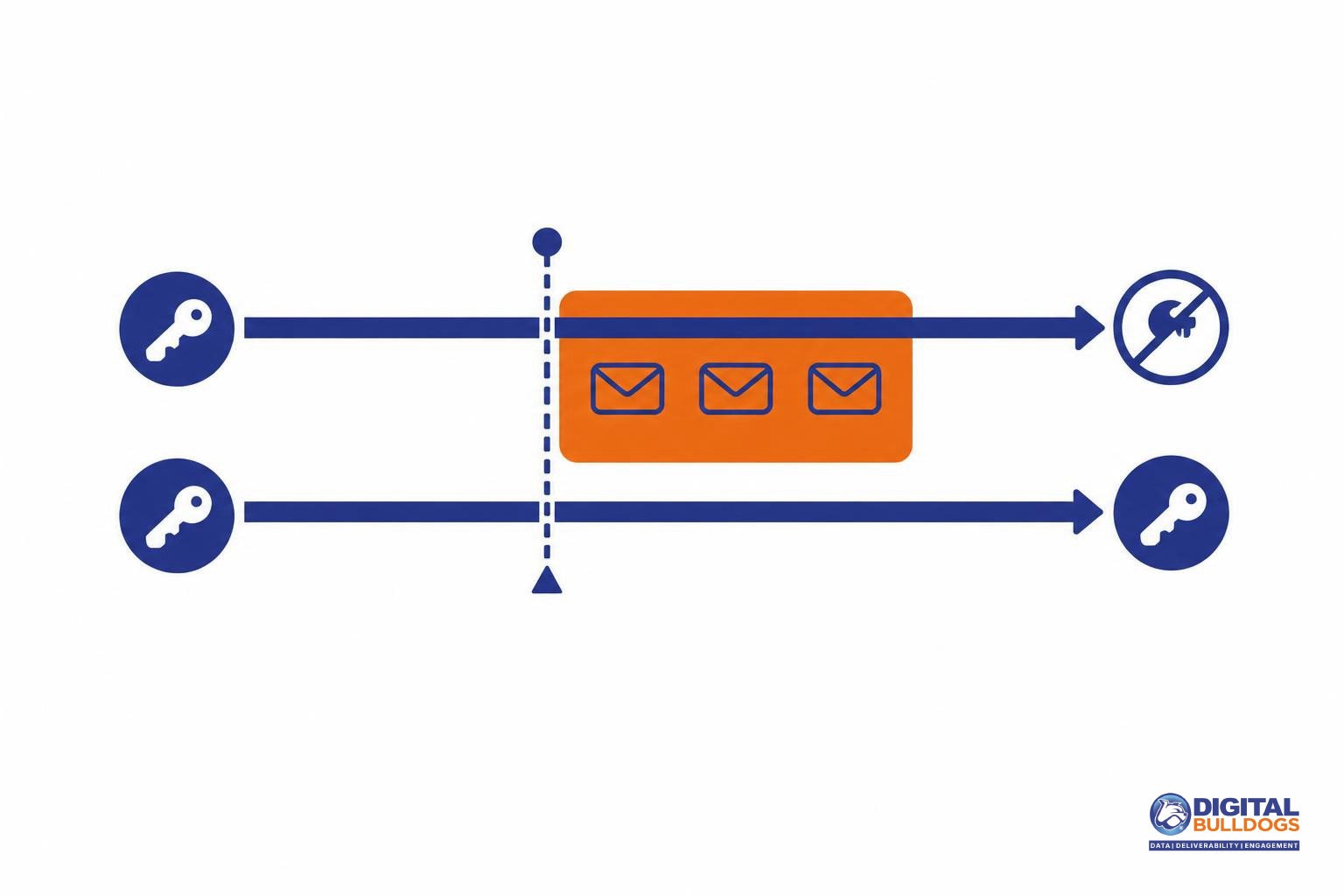
Rotate your DKIM keys at least twice a year, which is the cadence the M3AAWG best practices for implementing DKIM recommend. To avoid DKIM failures, make each DKIM key rotation an overlap rather than a swap. Publish the new key under a second selector, move signing to it, keep the old key in DNS until mail signed with it has been delivered, and then revoke the old key with an empty p= value instead of deleting the record.
This works because RFC 6376, the DKIM standard, uses selectors to give each domain its own key namespace, so two keys can be live at once. Messages already in transit still verify against the old selector while new mail is signed with the new one. If you send for clients, run affiliate campaigns across several domains, or rely on an ESP to sign for you, this two-selector habit keeps authentication steady while keys change in the background.
Below, you’ll learn why rotation matters, whether to use 1024-bit or 2048-bit keys, how to rotate step by step with a second selector, and how to verify the new key before you retire the old one. We also cover how long the overlap should last, and we end with a checklist you can reuse every rotation cycle.
How often should you rotate DKIM keys?
The short answer: at least twice a year, and immediately if you think a private key has been exposed. That is the guidance from M3AAWG, the industry working group whose best practices most large mailbox providers and email senders follow.
Its best practices for implementing DKIM recommend rotating keys at least twice per year. If you have seen quarterly rotation recommended elsewhere, that came from M3AAWG’s earlier advice, which this revised document replaced with the twice-a-year minimum.
The reason is simple. A DKIM private key that stays in use for years has years in which it could be copied, leaked, or cracked. Rotating on a schedule limits how long any one key could be misused. M3AAWG’s DKIM key rotation best common practices explain this reasoning and describe how to rotate without interrupting mail.
Two situations should change your timing:
- Suspected exposure: If a private key may have been shared, leaked, or left on a system you no longer control, rotate now. Do not wait for the next scheduled date.
- Staff or vendor changes: When the people or platforms that had access to your signing keys change, that is a sensible time to rotate.
Keep expectations realistic. Rotation is a security habit, not a deliverability boost. A fresh key will not lift your inbox placement. What it does is reduce the risk that someone else signs mail as your domain. Put it on the calendar like renewing a certificate. Done with the two-selector method below, it is a routine task that should not disrupt your sending.
Why DKIM key rotation matters
Rotating your DKIM keys limits the damage if a private key is ever exposed. A key that never changes is a risk that never expires.
A DKIM signature proves that a message was signed with the private key matching the public key in your DNS. Receiving servers trust that signature as evidence the mail came from your domain. That trust belongs to whoever holds the private key. If the key leaks through an old server, a former vendor, a misconfigured backup or a compromised account, someone else can sign mail that verifies as yours. That mail would carry your domain’s authentication, and your domain’s reputation, into the inbox.
The M3AAWG DKIM key rotation best practices describe rotation as doing two jobs:
- Reducing the chance that an active key gets compromised in the first place.
- Limiting how long a compromised key stays useful to whoever has it.
For senders who run several brands, offers or client domains, this matters even more. Each domain’s keys tend to pass through more hands, more platforms and more people over time.
Why selectors make safe rotation possible
Swapping one key for another sounds like it would break signing during the switch. Selectors solve that problem. RFC 6376, the DKIM standard, splits each domain’s key namespace into selectors. Each selector points to its own public key record, so a single domain can publish more than one key at the same time. The domain owner decides how many selectors to use, and the standard advises against reusing an old selector name for a new key.
In practice, this means two keys can be live at once during a changeover. You publish the new key under a fresh selector, move signing over to it, and leave the old key in place while messages already in transit are still being checked. That overlap is what lets you rotate without causing authentication failures. The rest of this guide shows how to manage it step by step.
DKIM key length: 1024 vs 2048-bit keys
Use 2048-bit RSA keys. The DKIM standard sets 1024 bits as the minimum and 2048 bits as the recommended size. If you are still on 1024, your next rotation is a good time to upgrade.
What the standard requires
RFC 8301, the DKIM cryptographic update, sets these rules:
- Signers MUST use RSA keys of at least 1024 bits and SHOULD use keys of at least 2048 bits.
- Verifiers must be able to validate keys from 1024 to 4096 bits. Keys shorter than 1024 bits fail verification.
- rsa-sha1 must not be used for signing or verifying. Open the headers of a recent message and check that the a= tag in your DKIM-Signature reads rsa-sha256.
What Google Workspace offers
In the Admin console, Google lets you generate either a 2048-bit or a 1024-bit key. Its Set up DKIM instructions recommend 2048 bits if your domain provider supports them, and 1024 bits only if it does not.
Publishing a longer key in DNS
A 2048-bit public key is longer than a single DNS TXT string can hold. Some DNS hosts split it into several quoted strings for you. Others expect you to split it yourself. After you publish, look up the record and compare it with the key your sending platform gave you. Make sure no characters were cut off or added. A truncated key fails just as a missing one does. If you are setting up the rest of your records at the same time, our step-by-step SPF, DKIM and DMARC setup for high-volume senders walks through each record.
Upgrade during rotation, under a new selector
Don’t overwrite your existing 1024-bit record with a 2048-bit key. Publish the 2048-bit key under a new selector as part of your next rotation, then follow the two-selector steps below. That way the old key keeps validating mail already in transit while the new key takes over.

Step by step: rotate DKIM keys with a second selector
The safe order is to publish the new key first, confirm that it resolves, and only then switch signing. If you reverse that order, receivers can’t find the key that matches your signatures, and your mail fails DKIM.
- List every system that signs mail for your domain. Include your main mail platform, each ESP, your CRM and any relays, and note the selector each one uses. Every signer needs its own rotation, so a forgotten one becomes a gap.
- Generate a new key pair under a new selector name. Don’t reuse the current selector for the new key. RFC 6376 advises against reusing selectors for new keys, because receivers then can’t tell forged mail apart from mail that failed because of the rotation.
- Publish the new public key in DNS. Query public resolvers and confirm they return the full record, including the complete key value. Don’t touch the signing side yet.
- Switch signing to the new private key. Do this only after the DNS record resolves correctly everywhere you checked. Leave the old public key published for now.
If you send through Google Workspace
Generate the new record with a different selector prefix if the domain already has a key under the current one. Google notes that DKIM authentication can take up to 48 hours to start working, so plan the switch with that window in mind.
Stage the next key before you need it
M3AAWG recommends publishing the next public key ahead of time. If a private key is ever exposed, an emergency rotation then becomes a quick signer change, with no wait for DNS.
When several vendors sign for one domain, keeping track of selectors gets messy fast. Our done-for-you DNS authentication setup can map each signer and stage the records for you. If that would help, you can book a free consult.
Verify the new key before retiring the old one
Before you change anything about the old selector, confirm with real messages that the new key is signing and passing. Because RFC 6376 lets several keys under different selectors be live at the same time, you can test calmly while the old key keeps covering any mail you have not switched yet.
Check the headers on test messages
Send test messages from each system you moved to mailboxes you control, ideally at more than one mailbox provider. Open the full message source and look at two headers:
- DKIM-Signature: the s= tag should show your new selector, and the d= tag should show your signing domain. If you still see the old selector, that system has not switched over.
- Authentication-Results: look for dkim=pass tied to the new selector. Also confirm that the d= domain still aligns with your visible From domain, so DMARC keeps passing after the change.
If you are unsure where these values appear, our guide on how to find your DKIM selector and confirm signing works walks through reading them.
Test every sending stream on its own
One passing test from your main mail platform does not prove that your CRM, help desk, billing system or email service provider has switched. Check each one separately. M3AAWG’s key rotation guidance treats third-party and delegated domains as a separate case, because the vendor may generate and control the key. For those senders, confirm with the vendor which selector it signs with and whether it handles rotation itself.
Leave the old DNS record untouched until every stream that should sign with the new key has been confirmed to do so. If keeping track of many senders feels hard to manage, you can book a free consult and we can help you map them out.
The overlap period: how long to keep the old key published
After you switch signing to the new selector, leave the old public key published and unchanged for a set period. Retire it only after that window ends, and retire it by revoking it, not by deleting it.
Why the old key needs to stay live
Switching selectors changes how new mail is signed. It does nothing to mail that was already signed. Messages signed with the old key may still be sitting in a queue, waiting on a retry after a temporary delivery failure, or being forwarded by a mailing list or a recipient’s own rules. When those messages finally arrive, the receiving server looks up the old selector to check the signature. If the key is gone, that signature can’t be verified.
That is why M3AAWG’s DKIM key rotation best practices recommend leaving the old public key in DNS, untouched, for an overlap period after signing moves to the new key. Revoke it only after that period has passed.
How to retire the old key correctly
- Wait out the overlap period. Keep the old selector’s record exactly as it was while in-flight mail drains.
- Empty the p= tag. Edit the old selector’s TXT record so the public key value is blank, for example v=DKIM1; p=. Under RFC 6376, the DKIM specification, an empty p= value means the key has been revoked.
- Keep the revoked record in place. Don’t delete the selector. A revoked key gives receivers a clear answer that the key was withdrawn. A missing record leaves them with only a failed lookup.
Match signature expiration to your schedule
If you set an expiration on your signatures, check it against your rotation plan. M3AAWG’s guidance on avoiding DKIM key length vulnerabilities says signature expiration should be longer than your key rotation period. It also says old keys should be revoked in DNS by clearing the p= field, rather than left active indefinitely.
DKIM key rotation checklist
Use this list each time you rotate. Work through it in order, and don’t move to the next stage until the current one checks out.
Before you rotate
- Inventory signers and selectors. List every platform that signs mail for your domains (your mailbox provider, ESPs, CRMs, help desk tools) and the selector each one uses.
- Back up your current DNS. Export or copy every existing DKIM TXT record so you can restore it quickly.
- Confirm access. Make sure you can edit DNS and have admin rights in each sending platform.
- Choose 2048-bit keys wherever your DNS host and sending platform support them.
During the rotation
- Generate the new key pair under a new selector name.
- Publish the new public key in DNS.
- Confirm the new record resolves correctly from outside your network.
- Switch signing to the new selector.
- Send test messages and check the headers for dkim=pass on the new selector.
After the rotation
- Keep the old key published through your overlap window.
- Revoke the old key by publishing an empty p= value rather than deleting the record, as the M3AAWG DKIM key rotation best practices recommend.
- Record the selector name, key length and rotation date.
- Schedule your next rotation now so it doesn’t slip.
If your rotations span several ESPs and domains, it’s easy to lose track of which selectors are still live, which are stale and which are still on short keys. An email deliverability audit maps every signer and selector in one place so you can see where to start. If you’d like help working through it, you can book a free consult with Digital Bulldogs. We’ll look at your setup with you, and there’s no obligation to continue.
Frequently asked questions
Is a 1024-bit DKIM key still valid?
Yes. A 1024-bit key still works, but it is the minimum. RFC 8301 requires signers to use RSA keys of at least 1024 bits and recommends at least 2048. Keys shorter than 1024 bits fail verification, so anything below that line is no longer usable.
If you send through Google Workspace, Google prefers 2048-bit keys when your domain provider supports them. Your next rotation is a good time to make that upgrade.
Can I reuse my old selector name for the new DKIM key?
No. Give the new key its own selector name. The DKIM standard says signers should not reuse selectors for new keys. Selectors exist so that several keys can be live at once. That lets you publish the new key alongside the old one instead of overwriting it.
If you reuse a name, receivers looking up that selector may fetch a key that doesn’t match the signature on mail still in transit.
How long should both DKIM keys stay published during rotation?
Keep both keys published until you’re confident no mail signed with the old key is still waiting to be verified. M3AAWG’s key rotation guidance calls for an overlap period before you revoke the old key. That window covers delayed deliveries and messages that are re-verified after they arrive.
Only retire the old selector after your reports show that signing has fully moved to the new one.
Should I delete the old DKIM record or revoke it?
Revoke it rather than deleting it. To revoke a key, keep the selector’s TXT record in DNS and clear the key value, leaving an empty p= tag. M3AAWG recommends revoking old keys by clearing the p= field, and the DKIM standard treats an empty p= as a revoked key.
A revoked key tells receivers that the key was deliberately withdrawn. A record that simply vanishes gives them no clear signal about what happened.
What should I do if my DKIM private key was exposed?
Treat it as urgent and don’t wait for your scheduled rotation. Generate a new key pair under a fresh selector, publish it, switch your signing over, and confirm that new mail passes. Then revoke the exposed key by clearing its p= value.
The usual overlap protects legitimate mail in transit. With a leaked key, weigh that protection against the risk that someone else can sign mail as your domain. If you’d like help working through the sequence, you can book a free consult with our team.
Sources
- RFC 6376: DomainKeys Identified Mail (DKIM) Signatures · IETF / RFC Editor · 2011-09-01
- RFC 8301: Cryptographic Algorithm and Key Usage Update to DKIM · IETF / RFC Editor · 2018-01-01
- M3AAWG DKIM Key Rotation Best Common Practices (updated March 2019) · M3AAWG · 2019-03-31
- M3AAWG Best Practices for Implementing DKIM To Avoid Key Length Vulnerability (revised July 2017) · M3AAWG · 2017-07-01
- Set up DKIM · Google Workspace Admin Help