
Email List Bombing Protection: Secure Your Signup Forms
Effective email list bombing protection combines CAPTCHA, backend submission checks, rate limits, and monitoring across signup forms to stop automated requests before they trigger email, as recommended in M3AAWG’s sender best practices. Use confirmed opt-in to keep unverified addresses off your active mailing list, but do not rely on it to stop floods: attackers can abuse confirmation messages themselves, as Spamhaus explains.
This guide covers how to recognize suspicious signups, protect the form and its submission path, combine confirmation with abuse controls, and monitor activity across forms. It also explains how to respond to abuse, investigate possible delivery damage, and keep suspect records out of email campaigns and audience activation.
Protect both the signup form and the mailing list
Protect your signup forms with automated-submission controls, confirmed opt-in, rate limits, and monitoring—not a single safeguard. This layered approach follows M3AAWG’s sender best practices: restrict automated submissions, watch for unusual signup activity across forms, and control how readily submissions trigger email.
A legitimate form becomes part of subscription bombing when someone submits another person’s email address, often through automation across many forms. Each submission can trigger a message the address owner never requested. M3AAWG’s web form signup attack guidance explains how publicly exposed forms can be used to flood a recipient’s mailbox.
There are two affected parties: the recipient whose inbox receives the flood and the sender whose form generates unwanted messages. Your form may be working exactly as designed while still contributing to the abuse. A submission alone is not evidence that the address owner wants your email.
Confirmed opt-in helps protect the mailing list, but it does not fully protect the recipient’s inbox. It can keep an unconfirmed address out of ongoing campaigns while still sending an unwanted confirmation message. When many forms do that, the confirmations themselves become the flood, as Spamhaus explains in its subscription bombing guidance.
Treat form protection and list management and hygiene as connected work: limit abusive submissions before they generate mail, then keep unconfirmed or suspect records out of regular campaigns.
Recognize suspicious signups before calling them growth
A jump in signups deserves a closer look before you count it as audience growth. It may reflect a successful campaign—or automated submissions that trigger unwanted email. Start by checking subscription-volume spikes and whether the same email address appears across multiple forms or client accounts. These are M3AAWG-recommended monitoring signals.
Compare the activity by signup source rather than judging the total contact count alone. For each unusual increase, ask:
- Where did the signups originate? Separate activity by form, landing page, campaign and client account.
- Does the timing make sense? Check whether the increase lines up with a campaign launch or another identifiable traffic source.
- Are addresses recurring across unrelated forms? Investigate patterns that are hard to explain through normal subscriber interest.
For a broader review of acquisition quality, use these signup sources ranked by deliverability risk to help prioritize which sources need closer scrutiny before their records become usable audiences.
Review complaints and delivery errors alongside the signup activity. Spamhaus recommends treating complaints as warning signals and reviewing bounce responses. Look for whether those problems cluster around the same sources or signup periods, rather than treating them as an unrelated sending issue.
These signals justify investigation; they do not prove that every affected record is malicious. Keep questionable signups separate while you assess their origin and subscription status, so a larger database does not automatically become a larger mailing audience.
Add CAPTCHA and protect the submission path
Put abuse checks before a form submission can trigger an email. Protecting publicly exposed signup forms against automated submissions is a central recommendation in M3AAWG’s web form guidance. The aim is to stop your signup process from becoming a tool for flooding someone else’s inbox.
Controls Before a Form Triggers Email
CAPTCHA
Require completion before submission.
Backend restrictions
Restrict which systems can submit.
Honeypot field
Use a hidden field to flag automation.
Use complementary controls rather than relying on a single visible challenge. M3AAWG’s sender best practices recommend layered defenses, including CAPTCHA, backend restrictions, and honeypots:
- Require CAPTCHA completion. Make successful validation a condition for accepting the signup, before any confirmation or welcome message is queued.
- Restrict backend submission access. Protect the endpoint that processes signups, not just the page displaying the form. A challenge on the page is not enough if a direct submission can avoid that check.
- Consider a hidden honeypot field. Use it as an additional signal of automated form completion, alongside the other checks—not as your only defense.
Apply these protections across forms that generate email, not only your main newsletter form. Spamhaus documents subscription-bombing abuse involving multiple kinds of signup messages, including confirmation requests. Review each public signup path and identify exactly when it can send a message.
These layers reduce opportunities for abuse; they do not make a form immune to it. Keep the controls aligned across your signup pages and their submission endpoints so an unprotected path does not undermine the rest.

Use confirmed opt-in without treating it as flood protection
Confirmed opt-in helps verify permission to send ongoing marketing. It does not stop automated submissions from triggering confirmation emails. Keep these jobs separate: confirm the recipient’s intent, and control abuse before your system generates mail.
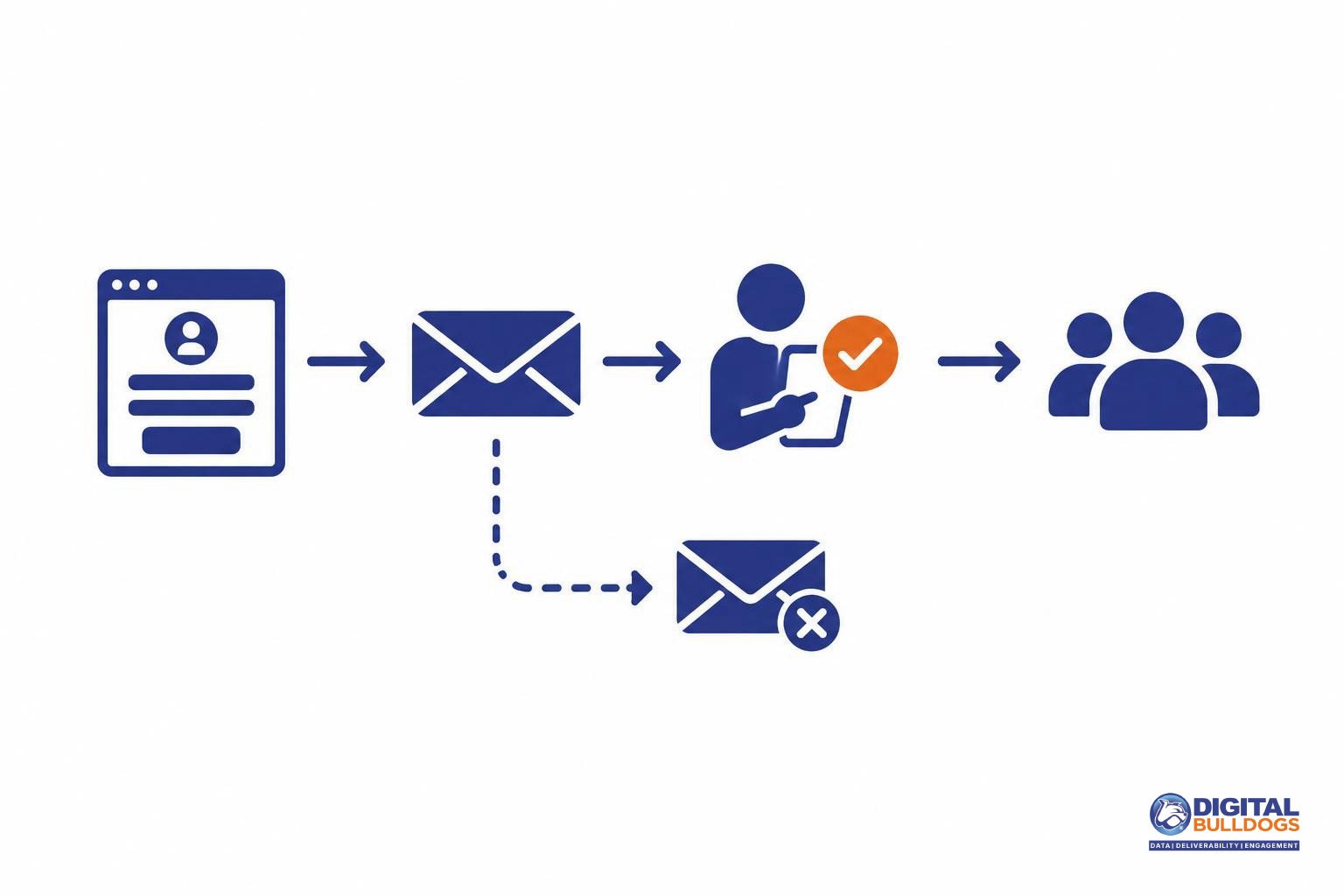
From Submitted Address to Confirmed Subscriber
Address submitted
A potential subscriber provides an email address.
Confirmation sent
Send a confirmation message with a consent link.
Recipient acts
The recipient follows the link to confirm.
Eligibility decided
Confirmed recipients can enter ongoing mailings. Without confirmation, send no further email.
Google’s subscription guidelines recommend confirming an email address before sending subscription messages. Build that requirement into your signup flow:
- Address submitted: Store the address as pending, not as an active marketing subscriber.
- Confirmation sent: Send a message asking the recipient to confirm the request.
- Recipient acts: Require them to follow the confirmation link.
- Marketing becomes eligible: Only after confirmation should the address enter the intended subscription or welcome series.
If the recipient does not confirm, do not send further marketing or enroll the address in a welcome series. Spamhaus’s confirmed opt-in guidance says no further email should follow without confirmation. When reviewing double opt-in versus single opt-in trade-offs, keep permission verification separate from the form’s abuse controls.
The remaining risk is the confirmation message itself. As Spamhaus explains in its subscription-bombing analysis, attackers can flood a recipient’s inbox with confirmation requests even when senders use confirmed opt-in. Pair confirmation with CAPTCHA and submission controls that operate before email is generated. A pending subscriber status protects your marketing workflow; it does not, by itself, protect the recipient from a flood.
Pair signup rate limits with cross-form monitoring
Limit repeated submissions from the same IP address over time, but do not make an individual form your only monitoring point. Following M3AAWG’s list bombing defenses, combine IP-based limits with monitoring for signup spikes and repeated target email addresses across forms. Rate limits help restrict repeated activity from a single source; cross-form monitoring helps reveal patterns that a form-by-form view can miss.
For agencies managing hosted forms or multiple client accounts, that means reviewing activity across the signup infrastructure you control. Look for:
- Repeated source activity: An IP address submitting forms repeatedly within a defined period.
- Repeated target addresses: The same email address appearing across otherwise unrelated forms or client accounts.
- Changes in signup patterns: Unusual bursts or activity spread across forms rather than concentrated on one page.
A subscription-bombing attack can be distributed across websites and submission sources. Modest activity on your own form therefore does not rule out its participation in a wider confirmation flood. Equally, an IP limit alone cannot account for an attack arriving from many different addresses.
Use a layered configuration, not a universal rate-limit setting. Set limits around your forms’ normal activity, then review them alongside cross-form signals, CAPTCHA, backend submission restrictions and honeypots. The goal is to reduce automated submissions without treating every legitimate signup burst as abuse—or assuming that traffic below a local threshold is safe.
Respond to abuse and investigate delivery damage
If a signup path is being abused, contain the activity before letting more submissions trigger email. Keep suspected attack traffic out of campaign eligibility while you investigate.
- Restrict the affected signup path. Temporarily pause or limit submissions and the email they trigger. Removing suspect contacts later will not stop an exposed form from generating more messages.
- Separate suspect records. Hold submissions associated with the incident outside your active marketing audience. Do not treat a submitted address as permission to send campaigns.
- Involve your email service provider. Share the affected forms, timing, signup patterns and relevant sending logs. Ask the provider to help identify the abusive traffic and assess delivery impact.
A blocklist listing is a possible consequence, not an automatic outcome. In its account of subscription-bombing attacks, Spamhaus documented listing sending IPs that were major sources of bombing mail and described working with email service providers. That history does not establish that every incident leads to a listing; investigate the actual delivery responses and any confirmed listing.
Continue handling recipient feedback during containment. Process complaints and unsubscribe requests, suppress unsubscribed addresses, and review delivery responses for instructions to slow down or stop sending, following Spamhaus’s marketer guidance.
If a listing is confirmed, fix the abused signup path and follow the proper email blocklist removal process for the listing involved. Contact cleanup can help contain the incident, but it does not repair the form that allowed the unwanted mail to be generated.
Keep suspect records out of audience activation
A submitted address is not the same as recipient-confirmed permission. Keep suspect signups separate from campaign-ready records so form abuse does not become an audience-quality problem.
Use a record-handling workflow that preserves the distinction:
- Retain signup context. Store the signup source, confirmation status, and any abuse or permission dispute flags alongside the address. Do not let a form submission automatically make a record eligible for campaigns.
- Gate marketing sends. Keep unconfirmed or disputed records out of welcome series and email monetization sends. Spamhaus describes a confirmed opt-in process that requires confirmation before further email, alongside complaint handling and unsubscribe suppression.
- Review suspect data separately. Before including records in audience segments, append projects, or identity-resolution workflows, check their source and permission status. Additional attributes or an identity match should not substitute for email confirmation. This is part of maintaining contact data quality for accurate, mailable records.
Keep message purpose clear, too. Google distinguishes subscription messages from transactional messages and recommends different sending addresses for them. A form-triggered transactional message should not be treated as permission for ongoing marketing.
Apply these eligibility checks before exploring email list monetization options that protect your audience. If you need help reviewing list hygiene and delivery signals, book a free consult with Digital Bulldogs to discuss your current process and practical next steps.
Frequently asked questions
What is the difference between subscription bombing and unwanted bot signups?
Unwanted bot signups are automated form submissions; subscription bombing uses email-triggering forms to flood someone else’s inbox. The important distinction is what happens after submission: does the form merely create a suspect record, or does it send an unwanted message? M3AAWG describes how exposed signup forms can be abused to flood recipients. Protect both the submission process and the messages it triggers.
Does confirmed opt-in stop email list bombing?
No—not by itself. Confirmed opt-in controls whether an address becomes an active subscriber, but the confirmation message remains an email triggered by the form. Use it as a permission checkpoint, not your only submission safeguard. Follow Spamhaus’s confirmed opt-in guidance: require confirmation before adding the address to marketing sends, and send no further email if the recipient does not confirm.
Is CAPTCHA enough to protect a signup form?
No. CAPTCHA should be one layer, not the entire defense. M3AAWG’s sender best practices recommend combining controls such as CAPTCHA, backend restrictions, honeypots, IP-based rate limits, and monitoring across forms. Protect the submission endpoint as well as the visible form, and avoid relying on a single IP threshold: distributed submissions can limit the usefulness of that control.
Can signup form abuse get a sending IP blocklisted?
Yes, it can, although that outcome is not inevitable. Spamhaus’s account of subscription-bombing attacks describes historical listings of sending IPs involved in confirmation floods. If your forms are being abused, stop the unwanted message generation and work with your email service provider to investigate. Treat a listing as a delivery issue to resolve—not a reason to move the same abusive traffic elsewhere.
What should an agency monitor across client signup forms?
Build a shared view of signup volume, sudden spikes, repeated submissions, and patterns spanning multiple forms. Pair that review with confirmation activity, complaints, unsubscribe suppression, and delivery responses. Keep each client’s records distinguishable, and investigate unusual activity before treating it as growth. Quarantine suspect records from marketing sends, custom-audience exports, and data append workflows while you review how they entered the system.
Sources
- M3AAWG Recommendation on Web Form Signup Attacks · Messaging, Malware and Mobile Anti-Abuse Working Group
- Subscription Bombing: COI, CAPTCHA, and the Next Generation of Mail Bombs · Spamhaus · 2016-09-16
- M3AAWG Sender Best Common Practices · Messaging, Malware and Mobile Anti-Abuse Working Group · 2026-11-20
- Email subscription guidelines for senders · Google
- FAQs: Sending marketing emails — advice for marketers · Spamhaus